Jadwal 1Schedule 1
Selasa & KamisTuesday & Thursday
19.30–21.00 WIB19.30–21.00 WIB
17 November – 3 Desember 202617 November – 3 December 2026
Kelas grup · DataGroup class · Data
Kelas grup dengan enam pertemuan live untuk belajar Power BI dari nol sampai bisa membangun dashboard sendiri dari data mentah. Khusus perempuan, untuk pemula.A group class of six live meetings to learn Power BI from scratch, up to building your own dashboard from raw data. For women, and for beginners.
BiayaPrice
Rp 149.000
6 pertemuan · bisa cicil 2×6 meetings · can pay in 2 instalments
DurasiLength
6 × 90 min
Zoom · rekaman tersediaZoom · recordings included
KuotaSeats
15
per jadwalper schedule
Satu project, dari data mentah sampai dashboard.One project, from raw data to dashboard.
Belajar bersama peserta lain lewat Zoom, dengan demo langsung dari instruktur dan waktu untuk bertanya.Learn with other participants on Zoom, with live demos from the instructor and time for questions.
Materi dibagikan sebelum kelas dimulai, dan setiap pertemuan direkam, jadi bisa ditonton ulang kapan saja.Materials are shared before the class starts, and every meeting is recorded, so you can watch it again any time.
Cukup bisa Excel dasar. Tidak perlu pengalaman coding, SQL, atau statistik.Basic Excel is enough. No coding, SQL or statistics needed.
Lebih dari separuh waktu dipakai untuk demo dan praktik langsung, bukan teori.More than half the time goes to demos and hands-on practice, not theory.
Data penjualan toko kopi fiktif Kopi Kita Nusantara: kopi, teh, alat seduh, dan snack, lewat Website, Marketplace, dan Toko Offline di beberapa kota Indonesia, Januari 2024 – Desember 2025.Sales data from a fictional coffee shop, Kopi Kita Nusantara: coffee, tea, brewing gear and snacks, sold through its website, marketplaces and offline stores in several Indonesian cities, January 2024 – December 2025.
Hasil akhirnya satu Sales Performance Dashboard yang rapi dan interaktif, dibangun sendiri dari data mentah yang sengaja dibuat berantakan.You finish with a clean, interactive Sales Performance Dashboard, built yourself from raw data that is messy on purpose.
Setiap pertemuan 90 menit, live lewat Zoom bersama instruktur. Rekaman dibagikan setelah kelas. Pilih salah satu dari lima jadwal; materinya sama.Every meeting is 90 minutes, live on Zoom with the instructor. Recordings are shared after class. Choose one of five schedules; the material is the same.
Jadwal 1Schedule 1
19.30–21.00 WIB19.30–21.00 WIB
17 November – 3 Desember 202617 November – 3 December 2026
Jadwal 5Schedule 5
Sabtu 11.00–12.30 WIBSaturday 11.00–12.30 WIB
Minggu 15.30–17.00 WIBSunday 15.30–17.00 WIB
21 November – 6 Desember 202621 November – 6 December 2026
Jadwal 2Schedule 2
Sabtu 11.00–12.30 WIBSaturday 11.00–12.30 WIB
Minggu 15.30–17.00 WIBSunday 15.30–17.00 WIB
12 – 27 Desember 202612 – 27 December 2026
Jadwal 3Schedule 3
19.30–21.00 WIB19.30–21.00 WIB
15 Desember 2026 – 5 Januari 202715 December 2026 – 5 January 2027
Tidak ada kelas Kamis, 31 Desember (malam tahun baru).No class on Thursday 31 December (New Year’s Eve).
Jadwal 4Schedule 4
19.30–21.00 WIB
7 Januari – 26 Januari 20277 January – 26 January 2027
Setiap pertemuan menambah satu lapisan.Each meeting adds one layer.
Semua pertemuan memakai file project yang sama, sampai menjadi dashboard utuh di Pertemuan 6. Alurnya: Understand → Import → Clean → Transform → Model → Relate → Analyze → Visualize → Build Dashboard.Every meeting builds on the same project file, until it becomes a full dashboard in Meeting 6. The flow: Understand → Import → Clean → Transform → Model → Relate → Analyze → Visualize → Build Dashboard.
PertemuanMeeting 1
Interface Power BI Desktop; report, page, visual, dan model; workflow Power BI; memilih visual yang tepat (card, bar/column, line, table, slicer); struktur data tabular dan tipe data; import Excel dan CSV; raw data vs data siap analisis; data profiling; pengenalan Power Query Editor.The Power BI Desktop interface; reports, pages, visuals and the model; the Power BI workflow; choosing the right visual (card, bar/column, line, table, slicer); tabular data and data types; importing Excel and CSV; raw vs analysis-ready data; data profiling; an introduction to Power Query Editor.
PertemuanMeeting 2
Remove, rename, change type, null, duplicate, replace, filter; split dan merge column; custom column; merapikan Applied Steps; refresh.Remove, rename, change type, nulls, duplicates, replace, filter; split and merge columns; custom columns; tidying Applied Steps; refresh.
PertemuanMeeting 3
Fact vs dimension table; primary dan foreign key; relationship one-to-many; cardinality; calculated column vs measure; DAX dasar (SUM, AVERAGE, COUNT, DISTINCTCOUNT, MIN/MAX, IF, DIVIDE).Fact vs dimension tables; primary and foreign keys; one-to-many relationships; cardinality; calculated columns vs measures; basic DAX (SUM, AVERAGE, COUNT, DISTINCTCOUNT, MIN/MAX, IF, DIVIDE).
PertemuanMeeting 4
Measure KPI (gross profit, margin %, rata-rata nilai transaksi, perbandingan antar periode); Filters pane (visual, page, report level), slicer, cross-filter dan edit interactions, drill-down, Top N; format pane, judul dinamis, conditional formatting, data label, tooltip, sorting.KPI measures (gross profit, margin %, average transaction value, period comparisons); the Filters pane (visual, page and report level), slicers, cross-filtering and edit interactions, drill-down, Top N; the format pane, dynamic titles, conditional formatting, data labels, tooltips, sorting.
PertemuanMeeting 5
Dashboard vs report; menentukan audience dan pertanyaan bisnis; layout dan visual hierarchy; formatting yang konsisten.Dashboards vs reports; deciding the audience and business questions; layout and visual hierarchy; consistent formatting.
PertemuanMeeting 6
Merangkai semua bagian menjadi satu dashboard; data storytelling; presentasi dengan pola storytelling.Bringing every part into one dashboard; data storytelling; presenting with a storytelling pattern.
SertifikatCertificate
Di akhir kelas kamu mendapat tugas portofolio berdasarkan use case yang sudah disiapkan. Kamu membuat dashboard dari dataset yang diberikan, lalu mengirimkannya untuk dicek. Portofolio ini wajib untuk mendapatkan sertifikat, dan hasilnya bisa kamu tampilkan sebagai bukti kemampuanmu.At the end of the class you get a portfolio task based on use cases prepared for you. You build a dashboard from the dataset provided and submit it for review. The portfolio is required to earn the certificate, and the result can be shown as proof of your skills.
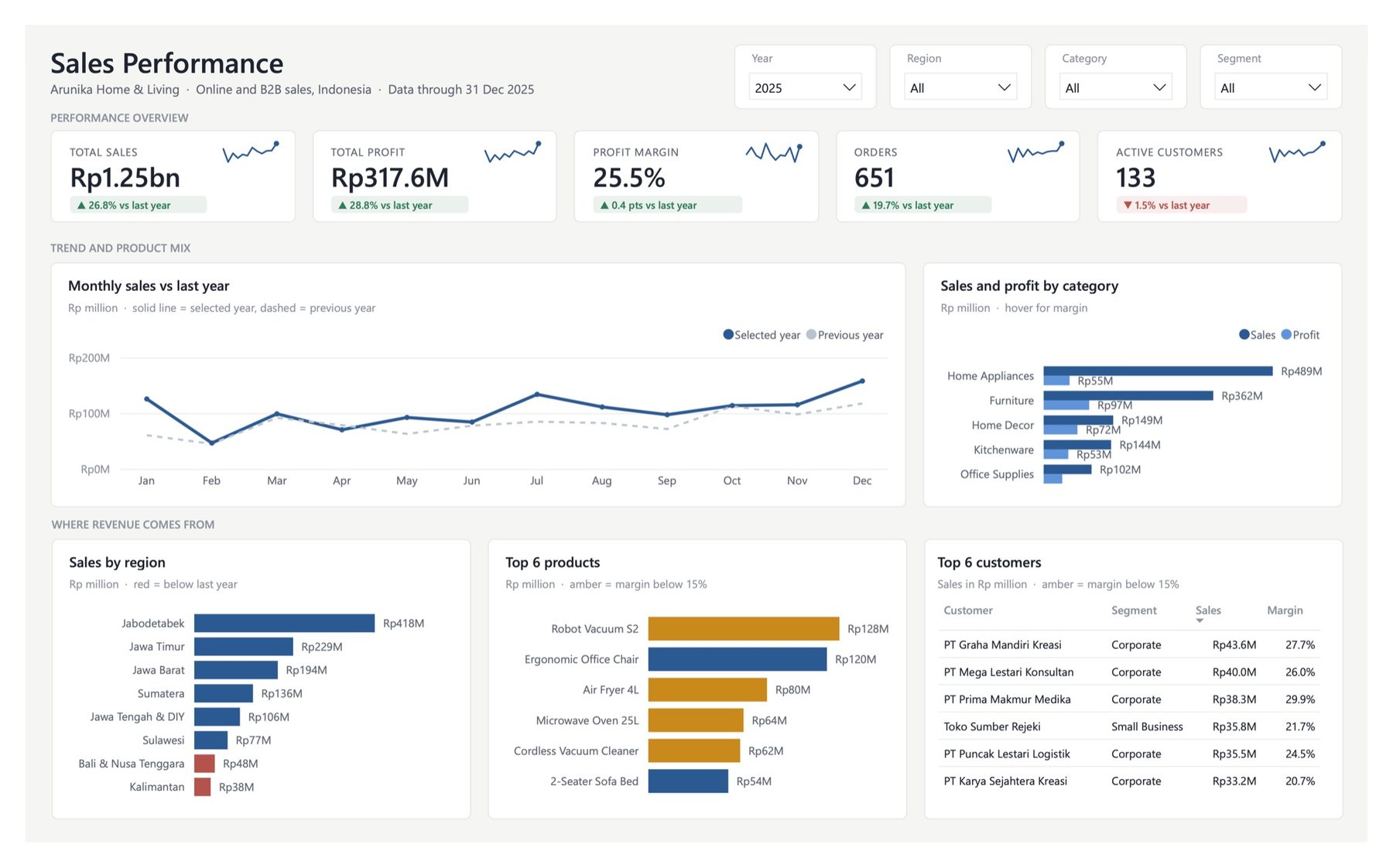
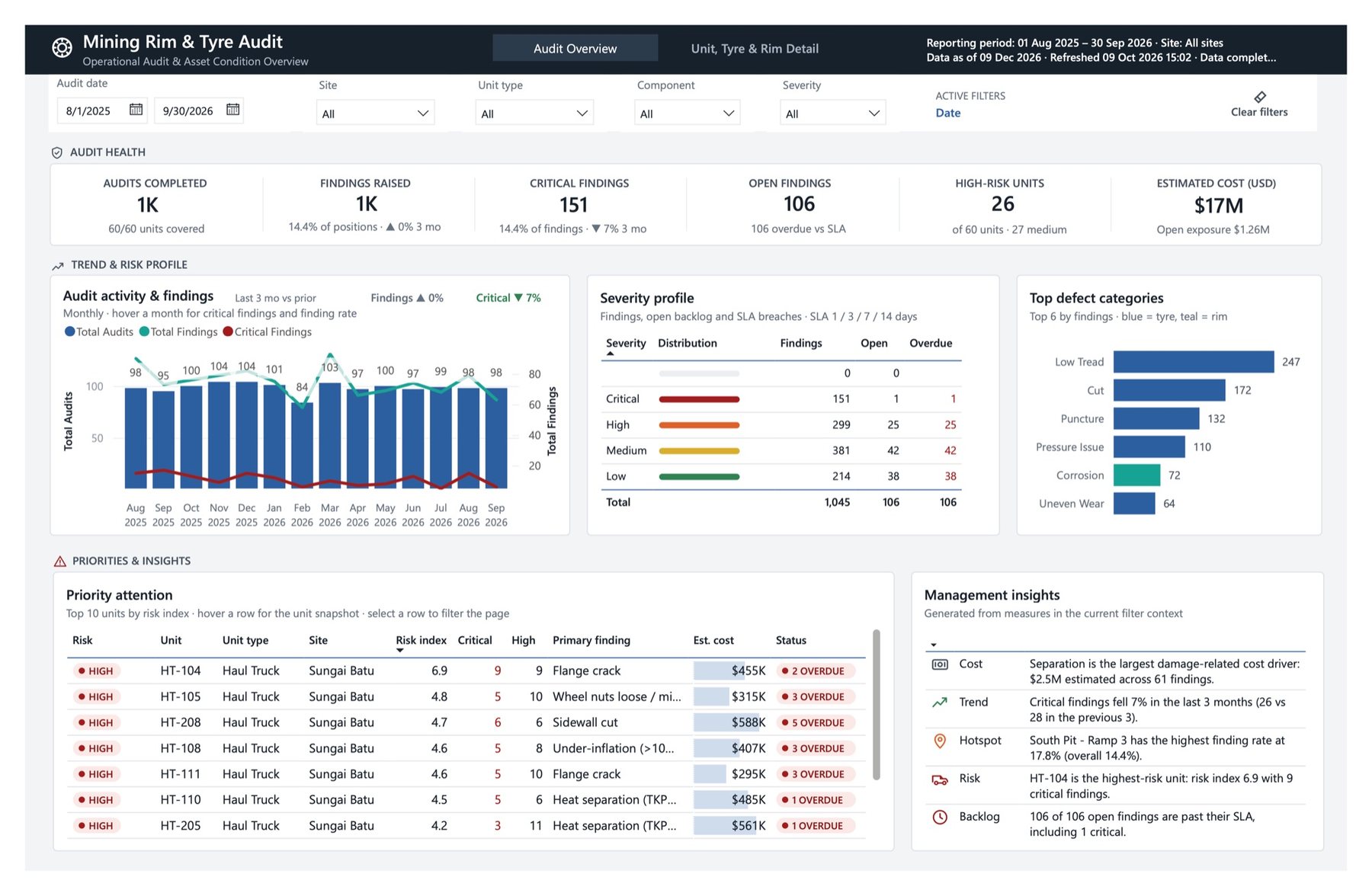
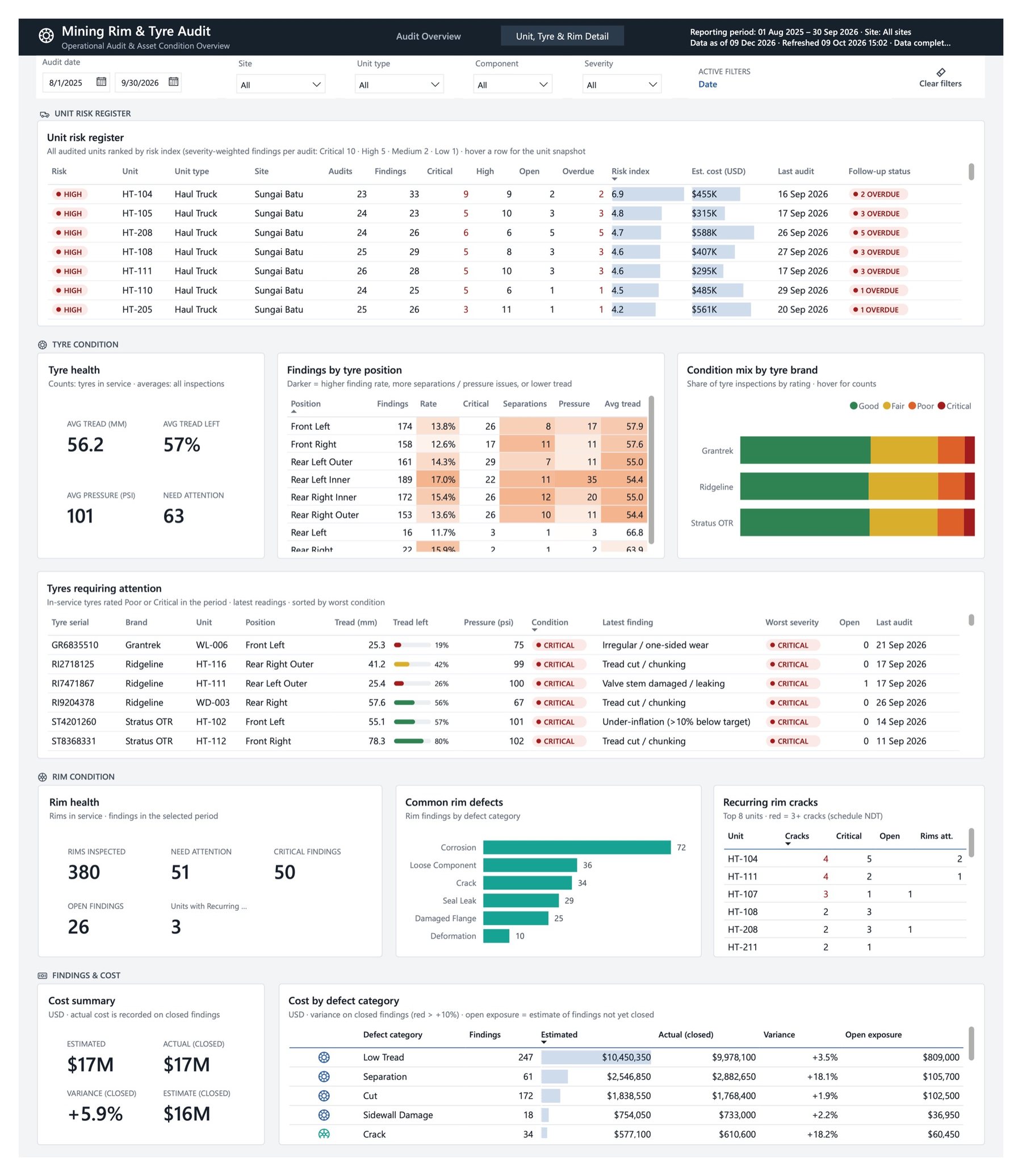
Seperti ini hasil yang bisa dibangun dengan Power BI: dari data mentah sampai dashboard yang interaktif.This is the kind of work Power BI makes possible: from raw data to an interactive dashboard.
Wajib: Power BI Desktop sudah ter-install dan bisa dibuka sebelum kelas dimulai. Instalasi dilakukan sendiri oleh peserta; tidak ada tutorial atau sesi bantuan instalasi, dan waktu kelas tidak dipakai untuk instalasi.Required: Power BI Desktop must be installed and opening before the class starts. Participants install it on their own; there is no installation tutorial or help session, and class time is not used for installing.
Kuota 15 peserta per jadwal, ditambah 3 kursi waiting list. Data pendaftaran hanya dipakai untuk kelas ini.15 seats per schedule, plus 3 waiting-list seats. Registration details are used only for this class.
FAQ
Bisa. Cukup bisa Excel dasar (buka file, filter, sort). Tidak perlu pengalaman coding, SQL, atau statistik.Yes. Basic Excel is enough (opening files, filtering, sorting). No coding, SQL, or statistics needed.
Power BI Desktop hanya untuk Windows. Kamu perlu Windows lewat Parallels atau meminjam laptop Windows.Power BI Desktop is Windows only. You need Windows via Parallels or a borrowed Windows laptop.
Rekaman dibagikan setelah kelas dan bisa diakses selama 3 bulan.Recordings are shared after class and available for 3 months.
Ya, dengan syarat hadir minimal 4 dari 6 pertemuan dan mengerjakan portofolio berdasarkan use case yang diberikan. Portofolio akan dicek sebelum sertifikat dikirim.Yes, on condition you attend at least 4 of 6 meetings and complete the portfolio based on the use cases given. The portfolio is checked before the certificate is sent.
Bisa, 2 kali. Setelah mendaftar, kamu akan dihubungi lewat WhatsApp untuk pembayaran.Yes, in 2 instalments. After registering, you will be contacted on WhatsApp for payment.
Tidak. Pembayaran yang sudah dilakukan tidak dapat dikembalikan.No. Payments that have been made cannot be refunded.
Tidak ada sesi instalasi. Power BI Desktop dipasang sendiri sebelum kelas dimulai.There is no install session. Install Power BI Desktop yourself before class starts.
Tidak ada bedanya. Materi dan tugasnya sama, hanya waktunya yang berbeda.There is no difference. The material and tasks are the same, only the times differ.
Tidak bisa pindah setelah mendaftar. Kalau jadwal yang dipilih penuh, kamu akan ditawari jadwal lain.You cannot change after registering. If your chosen schedule is full, you will be offered another one.
Ada. Grup tanya jawab berjalan sampai masa akses rekaman habis.Yes. The Q&A group runs until recording access ends.
Kelas ini khusus perempuan.This class is for women only.